
Shippie is an extendable code-review agent that reads diffs, uses developer tools to analyze code, and posts focused review comments. It can function as a Model Context Protocol (MCP) client and supports multiple AI providers. It runs via GitHub Actions or locally with a configurable workflow.
Collecting history — the radar snapshots this repo daily. The trend line appears after 3 days of data (1 so far).


What it is
Shippie is an extendable code-review agent. It runs an agent loop that reads your diff, explores the codebase with real developer tools, and posts focused review comments — picking up issues a human reviewer would, such as exposed secrets, slow or inefficient code, and potential bugs or unhandled edge cases. It can also act as a Model Context Protocol (MCP) client to reach external tools like browser automation, observability and documentation.
How it works
Shippie runs a prebuilt review workflow on flue and pi, functioning as a human code reviewer using flue's built-in tools. It is provider-agnostic and can work with Anthropic, OpenAI, OpenRouter, and Cloudflare Workers AI. It integrates with MCP to connect to external tooling.
Getting started
GitHub Action
Run npx shippie init to scaffold the workflow below, then add your provider API key as a repo secret. Or add it manually — it needs a full checkout (fetch-depth: 0), PR write permissions, and a provider API key.
# .github/workflows/shippie.yml
name: Shippie

on:
  pull_request:

permissions:
  pull-requests: write
  contents: read

jobs:
  review:
    runs-on: ubuntu-latest
    steps:
      - uses: actions/checkout@v4
        with:
          fetch-depth: 0
      - uses: mattzcarey/shippie@v0
        env:
          GITHUB_TOKEN: ${{ secrets.GITHUB_TOKEN }}
          ANTHROPIC_API_KEY: ${{ secrets.ANTHROPIC_API_KEY }}
See Action Options for all inputs (MODEL, THINKING_LEVEL, IGNORE, CUSTOM_INSTRUCTIONS, MCP_SERVERS, and the provider keys).
Local
Run the review workflow locally with no server. Local mode reviews your staged changes (git diff --cached) and writes results to .shippie/review/local_*.md:
npx shippie review
Run on demand with /shippie
Comment /shippie review on a pull request to run shippie on demand — either via a GitHub Actions workflow (no server) or a deployed webhook channel. See Run Shippie on demand.
Setup Instructions 💫
See the setup instructions for more docs on how to set up shippie in your CI/CD pipeline and run it locally.
Additional Documentation
- Setup - Get shippie running in CI and locally
- AI Provider Configuration - Configure Anthropic, OpenAI, OpenRouter, and Cloudflare Workers AI
- Action Options - GitHub Action configuration options
- Model Context Protocol (MCP) - Give shippie access to external tools
- Rules Files - Inject project context via
AGENTS.md/CLAUDE.mdand Agent Skills - Subagent Tool - Delegate work to flue subagents with the
tasktool - On-demand /shippie - Run shippie by commenting
/shippie(Actions or webhook)
Development 🔧
This repo targets Node >= 22.19 with npm.
-
Clone the repository:
git clone https://github.com/mattzcarey/shippie.git cd shippie -
Install dependencies:
npm install -
Set up your API key:
- Copy
.env.exampleto.env. - Set the provider key you want to use, e.g.
ANTHROPIC_API_KEY(orOPENAI_API_KEY,OPENROUTER_API_KEY,CLOUDFLARE_API_KEY+CLOUDFLARE_ACCOUNT_ID).
- Copy
-
Run the review workflow:
npm run review
Useful commands:
- `npm run dev` — run flue in dev mode
- `npm run build` — build a publishable Node server to `dist/server.mjs` (run it with `npm run start`, then `POST /workflows/review?wait=result`)
- `npm run check` — lint with oxlint + check formatting with oxfmt
- `npm run check:types` — typecheck with tsc
- `npm test` — run tests
See `package.json` for the full list of scripts.
## Contributors 🙏
Thanks to our wonderful contributors!
<a href="https://github.com/mattzcarey/shippie/graphs/contributors">
<img src="https://contrib.rocks/image?repo=mattzcarey/shippie" />
</a>
## Roadmap 🌏
Have a look at the [discussion tab](https://github.com/mattzcarey/shippie/discussions) for the latest chat and ideas. I am actively working on the items in [todo.md](todo.md).
## Star History ⭐️
[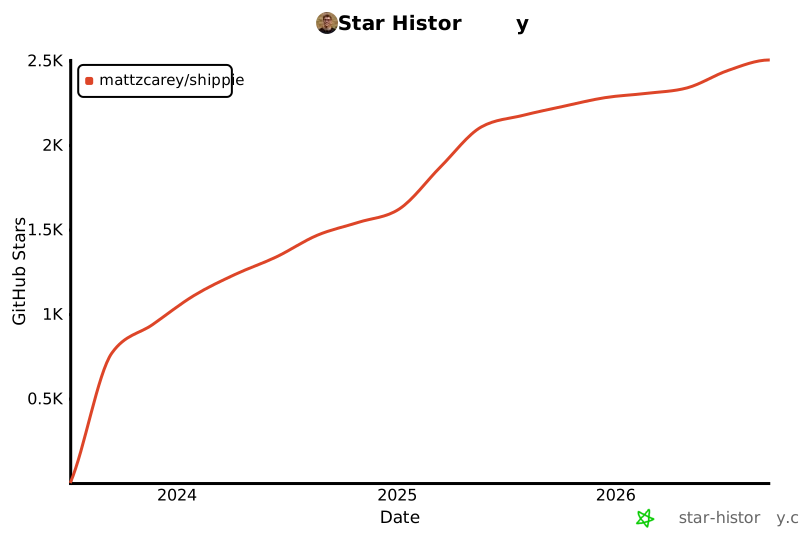](https://star-history.com/#mattzcarey/shippie&Date)